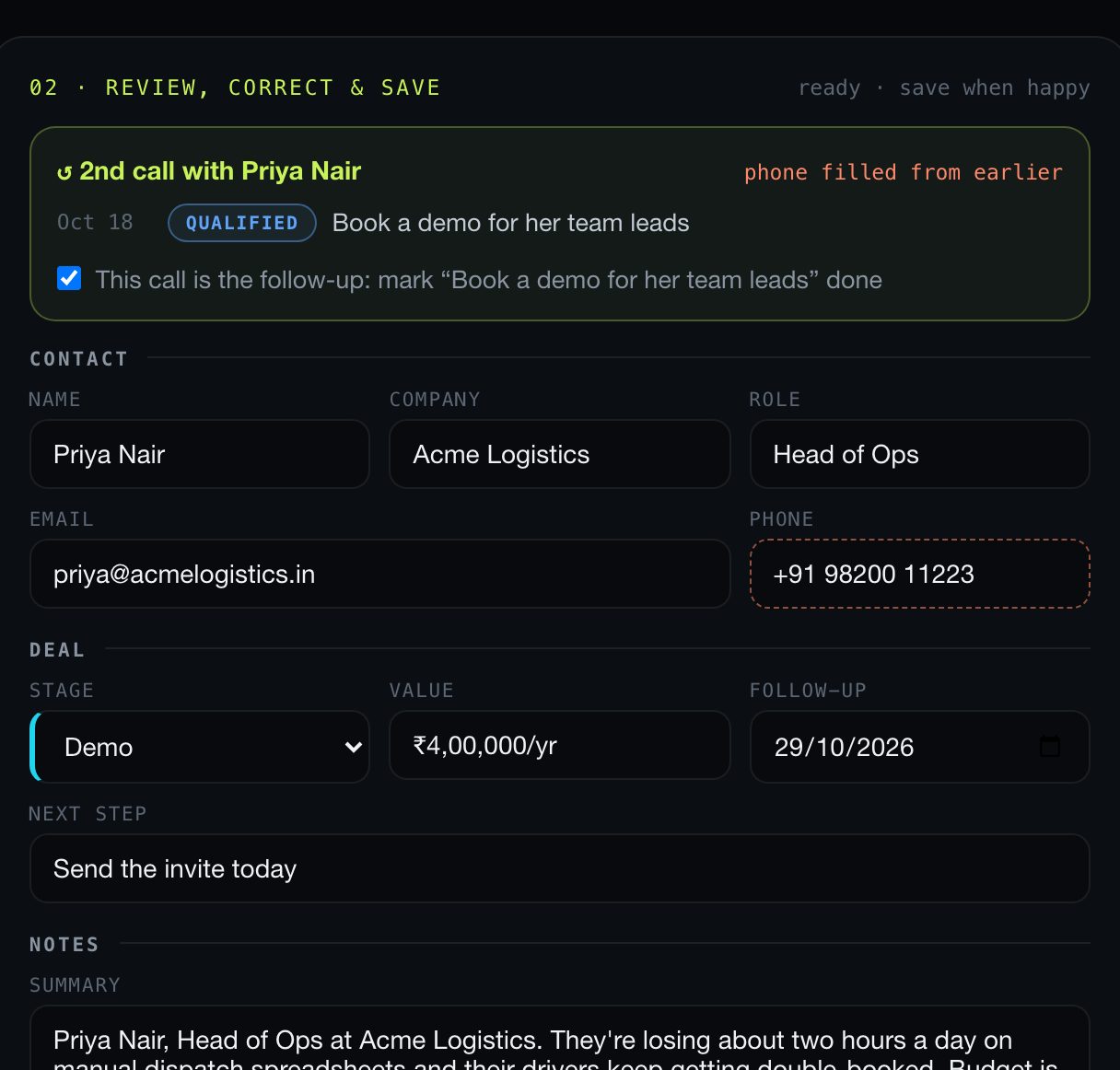
● Self-correction caught“Tuesday, no wait, Thursday” → follow-up on Thu 22 Oct.
✉ Follow-up drafted“Demo for your team leads on Thursday”, written from the same call.
Right after a sales call, just say what happened. Sayso turns your recap into a complete CRM record with contact details, deal stage, next step and follow-up date, before you've reached your next meeting.
Writing up a call takes longer than the call. So reps skip it, records go stale and follow-ups slip through the cracks.
Typing names, emails, next steps and notes into five different fields after every single call.
Missing emails, no deal value, no next step. Pipeline reviews turn into guesswork.
"I'll send it Thursday" lives in your head until it doesn't. Deals go cold quietly.
No forms, no tabs, no copy-paste. Your voice is the interface.
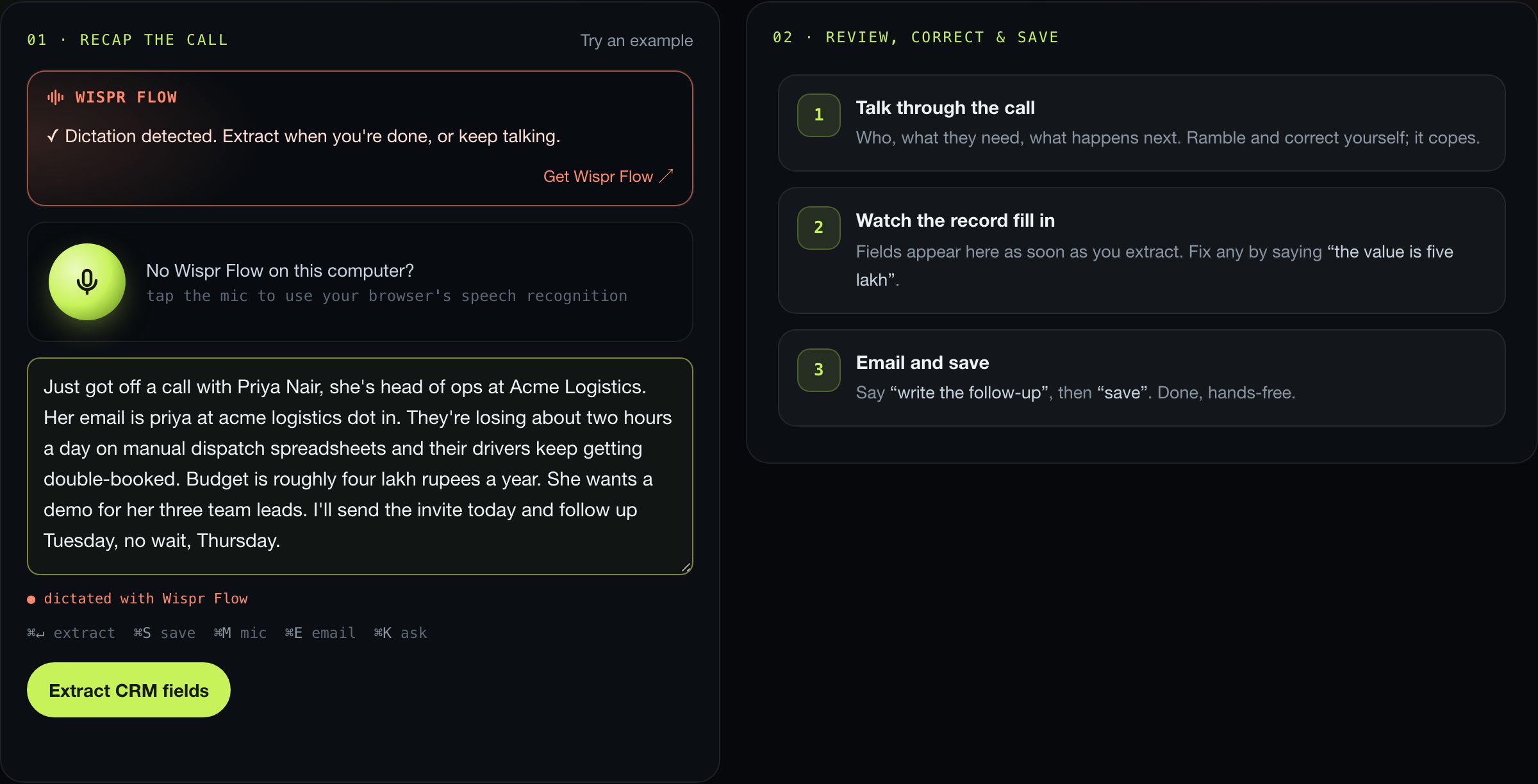
Tap the mic or dictate with Wispr Flow. Ramble, correct yourself, spell out emails. It's fine.
Sayso turns your recap into a full CRM record: contact, company, deal stage, value, next step and follow-up date, in a moment.
Fix anything by voice, say "write the follow-up" for a ready-to-send email, then "save". The follow-up date lands in your list.
Screenshots from the real app.
Click the recap box, then hold your Wispr Flow key (fn on a Mac) and talk. It works the same in the correction bar and Ask. Sayso spots dictated recaps, tags them, and counts how much of your CRM was written by voice. No Wispr Flow? The mic button uses your browser's speech recognition instead.
Dictate a messy, natural recap with Wispr Flow. Sayso spots the dictation, and two seconds after you stop talking it turns it into clean CRM fields by itself, with no API key needed.
Say what's wrong and only that field changes. Say “write the follow-up” and a short, specific email appears, drafted from the same call. Say “save” and you're done.
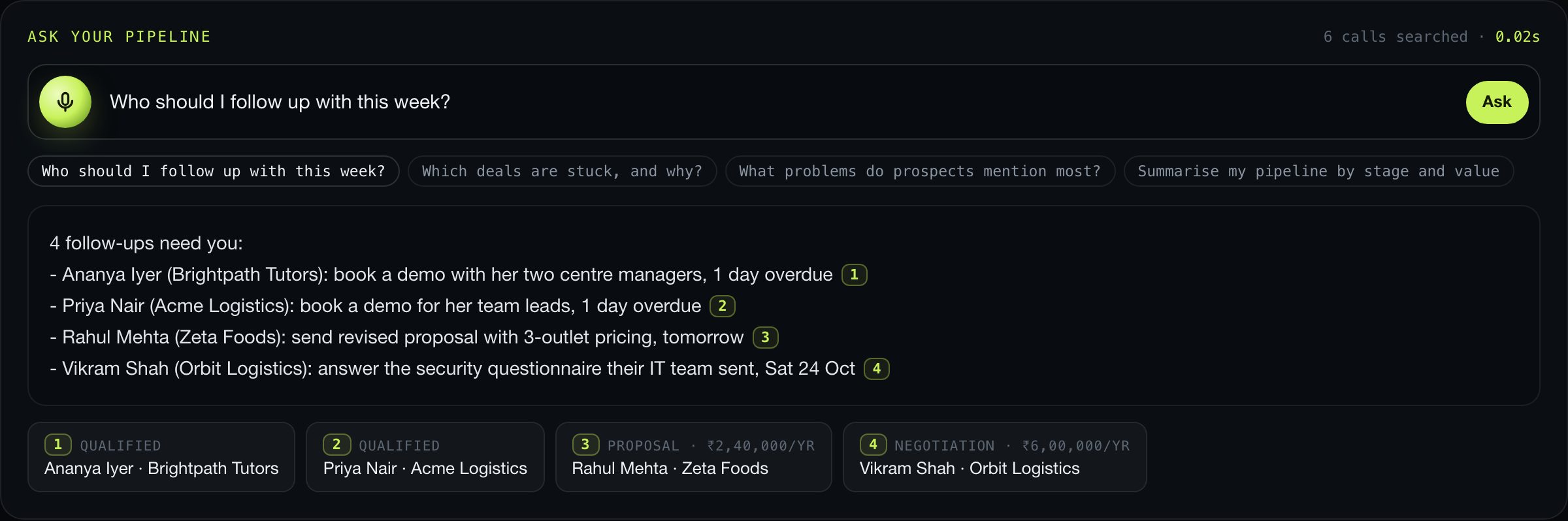
Who needs a follow-up this week? Which deals are stuck? What do prospects keep complaining about? Ask by voice or text and get a straight answer that cites the calls it came from.
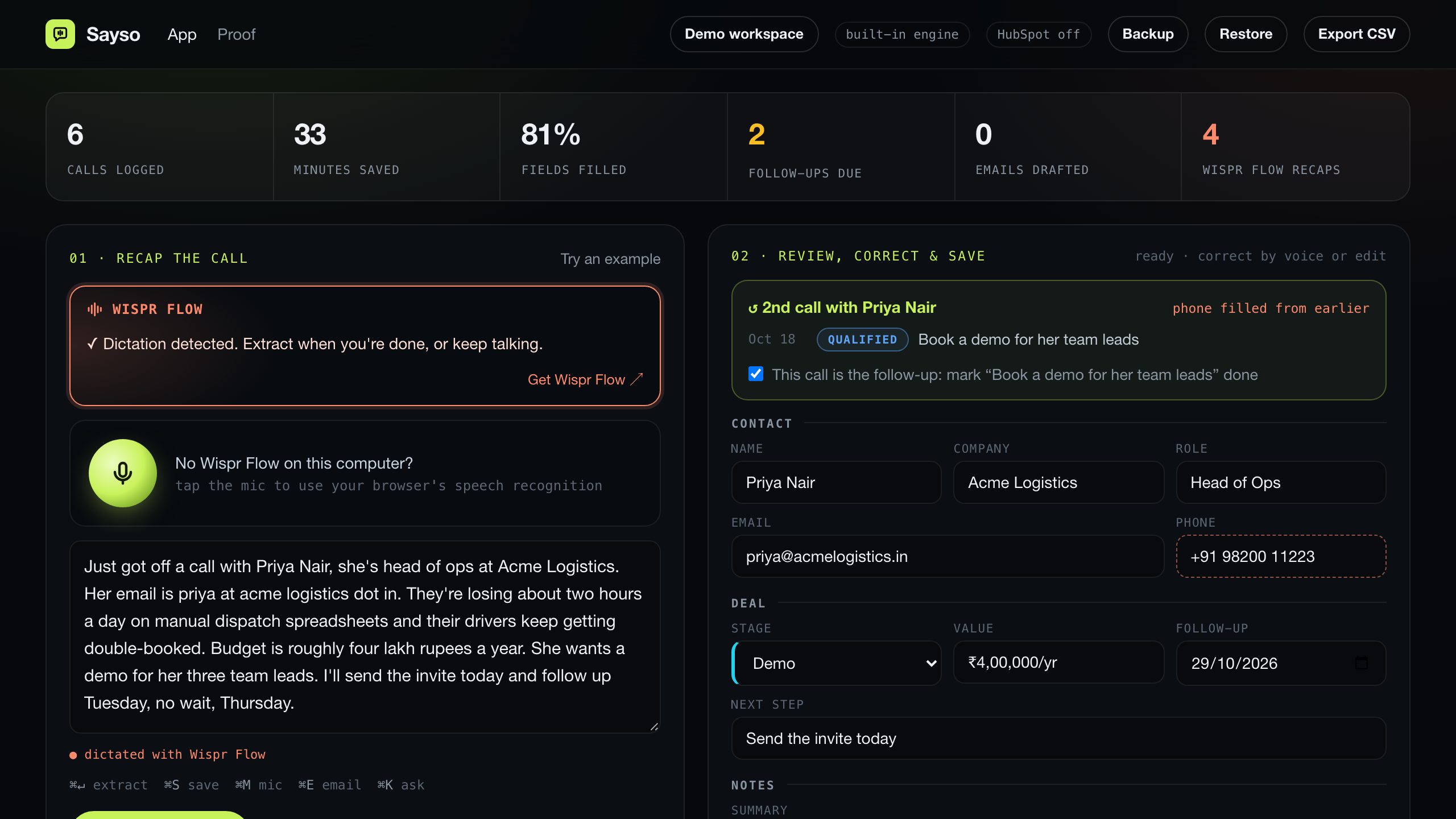
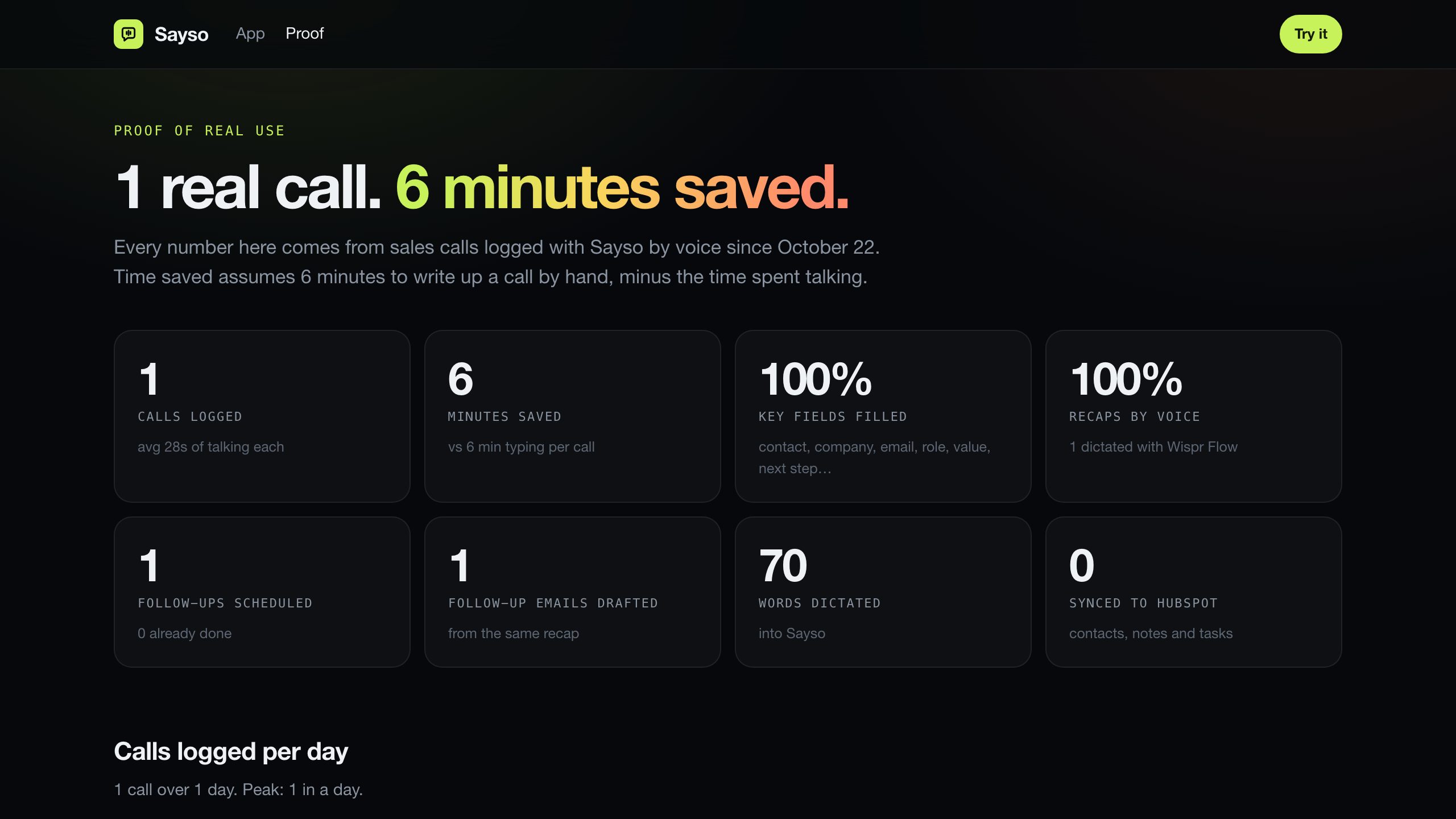
Every call adds to a live proof page: calls logged, minutes saved, fields filled and follow-ups sent, plus a share card for your weekly update.
"Next Friday" becomes a real date, and due follow-ups sit at the top until you mark them done.
Sync contacts, notes and tasks to HubSpot, or export a CSV that opens straight in Sheets or Excel.
Call Priya again and Sayso shows your history with her, fills in what you didn't repeat, and closes the old follow-up.
The call with Priya from Acme Logistics, logged two ways.
3 of 8 key fields, no date, no email sent. Typical when it's written up hours later.
Every key field, a dated follow-up, and the email already drafted.
Ten calls a week between building the product. Sayso keeps the pipeline honest without a sales ops hire.
Client calls turn into tidy notes, a dated next step and a follow-up email, so nothing slips while you do the work.
Reps talk, HubSpot fills itself, and the manager finally sees next steps and deal values on every record.
Open the CRM, find the contact, fill fields, write notes, create a task.
Thirty seconds of talking, a few seconds of review, one keystroke to save.
These come from real sales calls logged with Sayso.
Move the sliders. Write-up time only, before counting the deals you no longer forget to follow up.
Assumes about 35 seconds per call with Sayso (30s talking, a few seconds to review) and 48 working weeks a year.
No API key, no account, nothing to pay. The built-in engine runs right in your browser.
For founders and freelancers doing their own sales.
For small sales teams already on HubSpot.
Other CRMs, call-recorder imports and team rollouts.
Click a field in Sayso so the cursor is in it, then hold your Wispr Flow key (fn on a Mac) and talk, just like in any other app. Sayso recognises dictated recaps and shows on the proof page how much was written by voice. Without Wispr Flow, the mic button uses your browser's speech recognition.
Say the correction ("her email is actually…") or edit the field directly before you save. Sayso is told never to guess: if you didn't mention an email or amount, that field stays blank instead of being made up.
Yes. Click Open app and choose Set up my company: add your company name, your name, what you sell and your currency. You get an empty workspace for your own calls, follow-up emails are signed with your details, and amounts default to your currency. Prefer to look around first? Choose Open the demo.
No. Sayso's built-in engine pulls out names, companies, emails, phone numbers, amounts in lakh, crore or dollars, deal stages, dates and next steps, handles spoken corrections and answers pipeline questions, all without an API key. If you add an Anthropic key, Claude takes over for even better accuracy.
On this website, in your own browser: your company details and calls never reach a server. If you run Sayso yourself, they're kept in a file on that machine, and nothing leaves it unless you turn on HubSpot sync or add an optional Claude key.
It has a built-in CRM and a CSV export for Google Sheets or Excel. When you run Sayso yourself, it can also sync contacts, call notes and follow-up tasks to HubSpot.
The built-in engine fills the record in a fraction of a second, and the app shows exactly how long it took. Saving is instant; HubSpot syncs afterwards without making you wait.
Open the app, hit the mic and say what happened. That's the whole setup.